Client Command Executor

Le **Client Command Executor** est un terminal web interactif et sécurisé conçu pour exécuter les commandes CLI OpenShift (`oc`) directement au sein de l'interface web d'OpsBuddy. Il élimine la friction liée à la configuration d'environnements CLI locaux, à la manipulation de jetons d'authentification ou à la spécification répétée des espaces de noms (namespaces), tout en appliquant des contrôles de sécurité stricts pour prévenir l'injection de commandes et les évasions de conteneurs.

---

Architecture & Aperçu Opérationnel

Le Client Command Executor relie l'interface du navigateur au cluster OpenShift sous-jacent à l'aide d'une communication AJAX asynchrone et d'une authentification de session automatisée. Il permet aux opérateurs de cluster et aux administrateurs SAS d'exécuter rapidement des requêtes de diagnostic et de lecture sans quitter la console OpsBuddy.

Piliers Architecturaux Clés

1. Authentification de Session Automatisée (00_do_login.sh) :

- Avant d'exécuter une commande, le backend résout dynamiquement la session utilisateur authentifiée (

Client Command Executor

Le **Client Command Executor** est un terminal web interactif et sécurisé conçu pour exécuter les commandes CLI OpenShift (`oc`) directement au sein de l'interface web d'OpsBuddy. Il élimine la friction liée à la configuration d'environnements CLI locaux, à la manipulation de jetons d'authentification ou à la spécification répétée des espaces de noms (namespaces), tout en appliquant des contrôles de sécurité stricts pour prévenir l'injection de commandes et les évasions de conteneurs.

---

Architecture & Operational Overview

The Client Command Executor bridges the browser interface with the underlying OpenShift cluster using asynchronous AJAX communication and automated session authentication. It allows cluster operators and SAS administrators to quickly run diagnostic and read queries without leaving the OpsBuddy console.

Key Architectural Pillars

1. Automated Session Authentication (00_do_login.sh):

- Before executing any command, the backend dynamically resolves the authenticated user session ($_SESSION['username']) and the current active profile ($_SESSION['active_profile']).

- It invokes /var/www/cmd/00_do_login.sh with the profile configuration and user token (/var/www/conf/tokens/token__.txt), authenticating against the target cluster URL before running the requested command.

- The user never needs to manually authenticate or manage credentials during interactive execution.

2. Smart Prefixing & Namespace Auto-Injection:

- Prefix Badges: The input interface visually indicates that oc and -n are automatically bound to every query.

- Automatic oc Stripping: If an operator habitually enters oc get pods, the backend automatically strips the leading oc (substr($cmd, 3)), preventing duplicate oc oc command syntax.

- Intelligent Namespace Scoping: By default, the active environment's namespace (DEFAULT_NAMESPACE) is automatically injected (-n $DEFAULT_NAMESPACE). However, if an administrator explicitly includes a namespace flag (such as -n kube-system or --namespace=sas-viya), the module intelligently recognizes the flag via regex and respects the custom namespace.

3. Strict Shell Sanitization & Guardrails:

- To guarantee complete container security and prevent arbitrary command injection, all inputs are vetted against dangerous shell operators before execution.

- Any attempt to use shell chaining, redirection, or subshell expansion triggers an immediate client error and halts execution.

---

User Interface & Features
1. Interactive Command Input Bar
  • Prefix Indicators: Permanent visual badges displaying oc (dark badge) and -n (secondary badge) inform the operator of the execution context.
  • Auto-Focused Input: Monospace input field with autofocus enabled, configured with placeholder get pods and browser autocomplete disabled to prevent stale suggestions.
  • Run Button with Dynamic Spinner: Asynchronous execution triggered via the Run button or by pressing Enter. During execution, the button displays a loading spinner and is temporarily disabled to prevent duplicate submissions.
2. High-Performance Terminal Console
  • Dark-Themed Output Pane: A responsive 65vh scrollable terminal window formatted in monospace font (SFMono-Regular, Menlo, Monaco, Consolas).
  • Standard Error Integration: Captures and merges standard error with standard output (2>&1), ensuring cluster errors, warnings, and command usage guidance are fully visible.
  • Executed Command Header: Displays the precise command executed on the cluster (> oc -n ) above the output buffer.
  • One-Click Clipboard Copy: A dedicated Copy Output button utilizes the browser Clipboard API (navigator.clipboard.writeText) to instantly copy the complete console output buffer for sharing or ticketing.
3. Command History Panel
  • Persistent Local Storage: Execution history is automatically saved to the browser's localStorage (oc_cmd_history), persisting across browser sessions and page reloads.
  • Capacity & MRU Ordering: Stores up to 50 unique commands. Running a previously executed command moves it to the top of the history list.
  • Quick-Fill & Instant Run:

- Clicking on any command string in the history panel instantly populates it into the input box for modification.

- Clicking the adjacent Play button () immediately runs the command in real-time.

  • Layout Toggling: Use the Toggle History button to hide or show the right-hand history sidebar, dynamically expanding the terminal pane between a 9-column (col-md-9) and full-width 12-column (col-md-12) layout.
  • Clear History: Operators can purge their stored command history with a single click, protected by a confirmation prompt.

---

Security Specifications

The module enforces strict validation rules in 17_oc_executor.php:

| Operator | Symbol | Enforcement Reason |

| :--- | :---: | :--- |

| Command Chaining | ; | Prevents executing secondary arbitrary shell commands |

| Background / AND | & | Prevents spawning background processes or conditional chaining (&&) |

| Pipeline | \| | Prevents piping cluster data to destructive binaries or network sinks |

| Backtick Substitution | ` | Prevents subshell code execution |

| File Redirection | > < | Blocks writing to or reading from local container filesystem paths |

| Variable / Subshell | $ | Blocks shell variable expansion and subshell syntax ($(...)) |

If any of these characters are detected in the input, the request is rejected immediately with an informative alert:

> Shell operators (; & | > < $) are not allowed for security reasons.`

---

Common Operational Commands

The Client Command Executor supports all standard oc subcommands and flags that do not require shell operators:

  • Pod Inspection:

`bash

get pods

get pods -o wide

describe pod sas-logon-app-xxxx-yyyy

`

  • Service & Ingress Diagnostics:

`bash

get services

get routes

describe route sas-logon

`

  • Real-Time Resource Consumption:

`bash

adm top pods

adm top nodes

`

  • Event Auditing & Log Extraction:

`bash

get events --sort-by=.metadata.creationTimestamp

logs sas-cas-server-default-controller --tail=100

`

  • Storage & Configurations:

`bash

get pvc

get configmaps

`

  • Cross-Namespace Queries:

`bash

get pods -n openshift-monitoring

get nodes

`

---

Complementary Operational Modules

The Client Command Executor works hand-in-hand with other automated administration and monitoring tools available in OpsBuddy:

  • Morning Check Scheduler: Configures and schedules automated cluster health reports sent via email. Features a UI to define recipients, standard CRON expressions, and a manual test button. Automatically registers the job in the container's crontab.
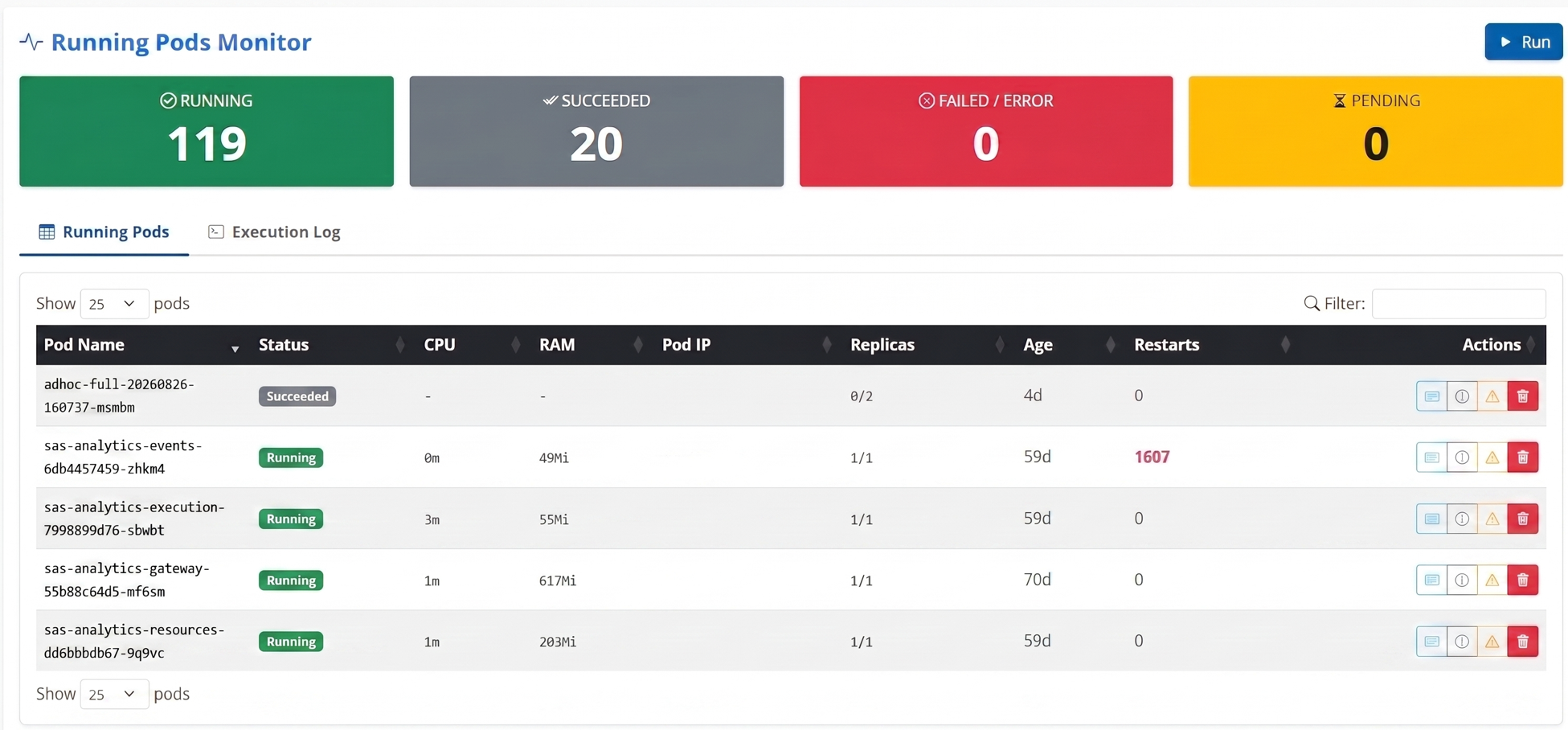
  • Running Pods Monitor: A high-performance, unified dashboard that merges real-time cluster metrics with comprehensive pod management. Features clickable summary KPI cards and merges raw OpenShift pod data with live oc adm top pods metrics to provide a unified grid of pod age, CPU, and RAM consumption.
What this module allows you to do:

- Live Search & Filter: Instantly search through hundreds of pods in real-time using DataTables.

- One-Click Actions: For any given pod, immediately fetch its Logs (with advanced JSON parsing separating Infos/Errors), Describe its configuration, view its recent Events, or securely Delete/Restart it.

- Smart Documentation: Hover over any pod name to reveal automated, structural documentation (tooltips) explaining the exact role of that specific SAS Viya microservice. This same architecture applies to the main dashboard, where hovering over any module card displays an in-depth English tooltip describing its functionality.

Picto
Interface Client Command Executor
SESSION['username']) et le profil actif actuel (

Client Command Executor

Le **Client Command Executor** est un terminal web interactif et sécurisé conçu pour exécuter les commandes CLI OpenShift (`oc`) directement au sein de l'interface web d'OpsBuddy. Il élimine la friction liée à la configuration d'environnements CLI locaux, à la manipulation de jetons d'authentification ou à la spécification répétée des espaces de noms (namespaces), tout en appliquant des contrôles de sécurité stricts pour prévenir l'injection de commandes et les évasions de conteneurs.

---

Architecture & Operational Overview

The Client Command Executor bridges the browser interface with the underlying OpenShift cluster using asynchronous AJAX communication and automated session authentication. It allows cluster operators and SAS administrators to quickly run diagnostic and read queries without leaving the OpsBuddy console.

Key Architectural Pillars

1. Automated Session Authentication (00_do_login.sh):

- Before executing any command, the backend dynamically resolves the authenticated user session ($_SESSION['username']) and the current active profile ($_SESSION['active_profile']).

- It invokes /var/www/cmd/00_do_login.sh with the profile configuration and user token (/var/www/conf/tokens/token__.txt), authenticating against the target cluster URL before running the requested command.

- The user never needs to manually authenticate or manage credentials during interactive execution.

2. Smart Prefixing & Namespace Auto-Injection:

- Prefix Badges: The input interface visually indicates that oc and -n are automatically bound to every query.

- Automatic oc Stripping: If an operator habitually enters oc get pods, the backend automatically strips the leading oc (substr($cmd, 3)), preventing duplicate oc oc command syntax.

- Intelligent Namespace Scoping: By default, the active environment's namespace (DEFAULT_NAMESPACE) is automatically injected (-n $DEFAULT_NAMESPACE). However, if an administrator explicitly includes a namespace flag (such as -n kube-system or --namespace=sas-viya), the module intelligently recognizes the flag via regex and respects the custom namespace.

3. Strict Shell Sanitization & Guardrails:

- To guarantee complete container security and prevent arbitrary command injection, all inputs are vetted against dangerous shell operators before execution.

- Any attempt to use shell chaining, redirection, or subshell expansion triggers an immediate client error and halts execution.

---

User Interface & Features
1. Interactive Command Input Bar
  • Prefix Indicators: Permanent visual badges displaying oc (dark badge) and -n (secondary badge) inform the operator of the execution context.
  • Auto-Focused Input: Monospace input field with autofocus enabled, configured with placeholder get pods and browser autocomplete disabled to prevent stale suggestions.
  • Run Button with Dynamic Spinner: Asynchronous execution triggered via the Run button or by pressing Enter. During execution, the button displays a loading spinner and is temporarily disabled to prevent duplicate submissions.
2. High-Performance Terminal Console
  • Dark-Themed Output Pane: A responsive 65vh scrollable terminal window formatted in monospace font (SFMono-Regular, Menlo, Monaco, Consolas).
  • Standard Error Integration: Captures and merges standard error with standard output (2>&1), ensuring cluster errors, warnings, and command usage guidance are fully visible.
  • Executed Command Header: Displays the precise command executed on the cluster (> oc -n ) above the output buffer.
  • One-Click Clipboard Copy: A dedicated Copy Output button utilizes the browser Clipboard API (navigator.clipboard.writeText) to instantly copy the complete console output buffer for sharing or ticketing.
3. Command History Panel
  • Persistent Local Storage: Execution history is automatically saved to the browser's localStorage (oc_cmd_history), persisting across browser sessions and page reloads.
  • Capacity & MRU Ordering: Stores up to 50 unique commands. Running a previously executed command moves it to the top of the history list.
  • Quick-Fill & Instant Run:

- Clicking on any command string in the history panel instantly populates it into the input box for modification.

- Clicking the adjacent Play button () immediately runs the command in real-time.

  • Layout Toggling: Use the Toggle History button to hide or show the right-hand history sidebar, dynamically expanding the terminal pane between a 9-column (col-md-9) and full-width 12-column (col-md-12) layout.
  • Clear History: Operators can purge their stored command history with a single click, protected by a confirmation prompt.

---

Security Specifications

The module enforces strict validation rules in 17_oc_executor.php:

| Operator | Symbol | Enforcement Reason |

| :--- | :---: | :--- |

| Command Chaining | ; | Prevents executing secondary arbitrary shell commands |

| Background / AND | & | Prevents spawning background processes or conditional chaining (&&) |

| Pipeline | \| | Prevents piping cluster data to destructive binaries or network sinks |

| Backtick Substitution | ` | Prevents subshell code execution |

| File Redirection | > < | Blocks writing to or reading from local container filesystem paths |

| Variable / Subshell | $ | Blocks shell variable expansion and subshell syntax ($(...)) |

If any of these characters are detected in the input, the request is rejected immediately with an informative alert:

> Shell operators (; & | > < $) are not allowed for security reasons.`

---

Common Operational Commands

The Client Command Executor supports all standard oc subcommands and flags that do not require shell operators:

  • Pod Inspection:

`bash

get pods

get pods -o wide

describe pod sas-logon-app-xxxx-yyyy

`

  • Service & Ingress Diagnostics:

`bash

get services

get routes

describe route sas-logon

`

  • Real-Time Resource Consumption:

`bash

adm top pods

adm top nodes

`

  • Event Auditing & Log Extraction:

`bash

get events --sort-by=.metadata.creationTimestamp

logs sas-cas-server-default-controller --tail=100

`

  • Storage & Configurations:

`bash

get pvc

get configmaps

`

  • Cross-Namespace Queries:

`bash

get pods -n openshift-monitoring

get nodes

`

---

Complementary Operational Modules

The Client Command Executor works hand-in-hand with other automated administration and monitoring tools available in OpsBuddy:

  • Morning Check Scheduler: Configures and schedules automated cluster health reports sent via email. Features a UI to define recipients, standard CRON expressions, and a manual test button. Automatically registers the job in the container's crontab.
  • Running Pods Monitor: A high-performance, unified dashboard that merges real-time cluster metrics with comprehensive pod management. Features clickable summary KPI cards and merges raw OpenShift pod data with live oc adm top pods metrics to provide a unified grid of pod age, CPU, and RAM consumption.

What this module allows you to do:

- Live Search & Filter: Instantly search through hundreds of pods in real-time using DataTables.

- One-Click Actions: For any given pod, immediately fetch its Logs (with advanced JSON parsing separating Infos/Errors), Describe its configuration, view its recent Events, or securely Delete/Restart it.

- Smart Documentation: Hover over any pod name to reveal automated, structural documentation (tooltips) explaining the exact role of that specific SAS Viya microservice. This same architecture applies to the main dashboard, where hovering over any module card displays an in-depth English tooltip describing its functionality.

Picto
Interface Client Command Executor
SESSION['active_profile']
).

- Il invoque /var/www/cmd/00_do_login.sh avec la configuration du profil et le jeton de l'utilisateur (/var/www/conf/tokens/token_<user>_<profile>.txt), s'authentifiant contre l'URL du cluster cible avant d'exécuter la commande demandée.

- L'utilisateur n'a jamais besoin de s'authentifier manuellement ou de gérer des identifiants pendant l'exécution interactive.

2. Préfixage Intelligent & Injection Automatique du Namespace :

- Badges de Préfixe : L'interface de saisie indique visuellement que oc et -n <namespace> sont automatiquement liés à chaque requête.

- Suppression Automatique de oc : Si un opérateur saisit habituellement oc get pods, le backend supprime automatiquement le oc initial (substr($cmd, 3)), empêchant la syntaxe de commande dupliquée oc oc.

- Délimitation Intelligente du Namespace : Par défaut, le namespace de l'environnement actif (DEFAULT_NAMESPACE) est automatiquement injecté (-n $DEFAULT_NAMESPACE). Cependant, si un administrateur inclut explicitement un flag de namespace (tel que -n kube-system ou --namespace=sas-viya), le module reconnaît intelligemment le flag via une expression régulière (regex) et respecte le namespace personnalisé.

3. Assainissement Strict du Shell & Garde-fous :

- Pour garantir une sécurité totale des conteneurs et empêcher l'injection de commandes arbitraires, toutes les entrées sont vérifiées contre les opérateurs de shell dangereux avant l'exécution.

- Toute tentative d'utiliser le chaînage de shell, la redirection ou l'expansion de sous-shell déclenche une erreur client immédiate et interrompt l'exécution.

---

Interface Utilisateur & Fonctionnalités
1. Barre de Saisie de Commande Interactive
  • Indicateurs de Préfixe : Des badges visuels permanents affichant oc (badge sombre) et -n <default_namespace> (badge secondaire) informent l'opérateur du contexte d'exécution.
  • Champ de Saisie Auto-Ciblé : Champ de saisie monospace avec autofocus activé, configuré avec l'espace réservé (placeholder) get pods et la saisie automatique du navigateur désactivée pour éviter les suggestions obsolètes.
  • Bouton Exécuter avec Spinner Dynamique : Exécution asynchrone déclenchée via le bouton Run ou en appuyant sur Enter. Pendant l'exécution, le bouton affiche un spinner de chargement et est temporairement désactivé pour empêcher les soumissions en double.
2. Console Terminal Haute Performance
  • Panneau de Sortie à Thème Sombre : Une fenêtre de terminal défilable réactive de 65vh formatée en police monospace (SFMono-Regular, Menlo, Monaco, Consolas).
  • Intégration de l'Erreur Standard (Standard Error) : Capture et fusionne l'erreur standard avec la sortie standard (2>&1), s'assurant que les erreurs du cluster, les avertissements et les conseils d'utilisation des commandes sont entièrement visibles.
  • En-tête de Commande Exécutée : Affiche la commande précise exécutée sur le cluster (> oc -n <namespace> <command>) au-dessus du tampon de sortie.
  • Copie dans le Presse-papiers en Un Clic : Un bouton dédié Copy Output utilise l'API Presse-papiers du navigateur (navigator.clipboard.writeText) pour copier instantanément l'intégralité du tampon de sortie de la console pour le partage ou la création de tickets.
3. Panneau d'Historique des Commandes
  • Stockage Local Persistant : L'historique d'exécution est automatiquement enregistré dans le localStorage du navigateur (oc_cmd_history), persistant à travers les sessions de navigateur et les rechargements de page.
  • Capacité & Tri MRU (Le Plus Récemment Utilisé) : Stocke jusqu'à 50 commandes uniques. L'exécution d'une commande précédemment exécutée la déplace en haut de la liste d'historique.
  • Remplissage Rapide & Exécution Instantanée :

- Cliquer sur n'importe quelle chaîne de commande dans le panneau d'historique la remplit instantanément dans la zone de saisie pour modification.

- Cliquer sur le bouton Play adjacent () exécute immédiatement la commande en temps réel.

  • Basculement de la Mise en Page : Utilisez le bouton Toggle History pour masquer ou afficher la barre latérale d'historique à droite, élargissant dynamiquement le panneau du terminal entre une disposition à 9 colonnes (col-md-9) et une largeur totale à 12 colonnes (col-md-12).
  • Effacer l'Historique (Clear History) : Les opérateurs peuvent purger leur historique de commandes stocké en un seul clic, protégé par une invite de confirmation.

---

Spécifications de Sécurité

Le module applique des règles de validation strictes dans 17_oc_executor.php :

| Opérateur | Symbole | Raison de l'Application |

| :--- | :---: | :--- |

| Chaînage de Commandes | ; | Empêche l'exécution de commandes shell arbitraires secondaires |

| Arrière-plan / ET (AND) | & | Empêche le lancement de processus en arrière-plan ou le chaînage conditionnel (&&) |

| Pipeline | \| | Empêche la transmission de données du cluster vers des binaires destructeurs ou des puits réseau |

| Substitution par Backtick | ` | Empêche l'exécution de code dans un sous-shell |

| Redirection de Fichier | > < | Bloque l'écriture ou la lecture depuis des chemins du système de fichiers du conteneur local |

| Variable / Sous-shell | $ | Bloque l'expansion de variables shell et la syntaxe de sous-shell ($(...)) |

Si l'un de ces caractères est détecté dans l'entrée, la demande est rejetée immédiatement avec une alerte informative :

> Shell operators (; & | > < $) are not allowed for security reasons.`

---

Commandes Opérationnelles Courantes

Le Client Command Executor prend en charge toutes les sous-commandes et tous les flags standard de oc qui ne nécessitent pas d'opérateurs de shell :

  • Inspection de Pod :

`bash

get pods

get pods -o wide

describe pod sas-logon-app-xxxx-yyyy

`

  • Diagnostics de Service & Ingress :

`bash

get services

get routes

describe route sas-logon

`

  • Consommation des Ressources en Temps Réel :

`bash

adm top pods

adm top nodes

`

  • Audit des Événements & Extraction des Logs :

`bash

get events --sort-by=.metadata.creationTimestamp

logs sas-cas-server-default-controller --tail=100

`

  • Stockage & Configurations :

`bash

get pvc

get configmaps

`

  • Requêtes Inter-Namespace :

`bash

get pods -n openshift-monitoring

get nodes

`

---

Modules Opérationnels Complémentaires

Le Client Command Executor fonctionne de concert avec d'autres outils automatisés d'administration et de surveillance disponibles dans OpsBuddy :

  • Planificateur de Vérification Matinale (Morning Check Scheduler) : Configure et planifie des rapports automatisés sur la santé du cluster envoyés par e-mail. Dispose d'une interface utilisateur pour définir les destinataires, des expressions CRON standard, et d'un bouton de test manuel. Enregistre automatiquement la tâche dans le crontab du conteneur.
  • Surveillance des Pods en Exécution (Running Pods Monitor) : Un tableau de bord unifié haute performance qui fusionne les métriques du cluster en temps réel avec une gestion complète des pods. Dispose de cartes KPI récapitulatives cliquables et fusionne les données brutes des pods OpenShift avec les métriques en direct de oc adm top pods pour fournir une grille unifiée de l'âge des pods, de la consommation CPU et de la RAM.

Ce que ce module vous permet de faire :

- Recherche & Filtrage en Direct : Recherchez instantanément parmi des centaines de pods en temps réel à l'aide de DataTables.

- Actions en Un Clic : Pour un pod donné, récupérez immédiatement ses Logs (avec un parsing JSON avancé séparant Infos/Errors), Décrivez (Describe) sa configuration, visualisez ses Événements (Events) récents, ou Supprimez/Redémarrez-le en toute sécurité.

- Documentation Intelligente : Survolez n'importe quel nom de pod pour révéler une documentation automatisée et structurelle (infobulles) expliquant le rôle exact de ce microservice SAS Viya spécifique. Cette même architecture s'applique au tableau de bord principal, où le survol de n'importe quelle carte de module affiche une infobulle approfondie en anglais décrivant sa fonctionnalité.

Picto
Interface Client Command Executor
Retour à la présentation globale